Casinos Accepting Paysafecard
 | Updated:
 Hunting for the best casino sites that accept Paysafecard? Below you will find our expert-picked online casinos supporting Paysafecard deposits and withdrawals.





Established in 2000, Paysafecard has become a global leader in secure payment solutions, currently reaching consumers in more than 60 countries. Many online casinos have also adopted the method, listing it among the supported deposit options in their cashiers. The company’s core product is the eponymous prepaid voucher, Paysafecard. It enables online gamblers to anonymously fund their casino balances using nothing but the 16-character code printed on their vouchers. Players can purchase vouchers in different denominations online or in person at over 650,000 retail locations.
| Summary | |
|---|---|
| Country used in | Worldwide |
| Website | www.paysafecard.com |
| Accepted by | Over 250 Online Casinos |
| Casino Games with Paysafecard | Slots, Roulette, Blackjack, Video Poker |
| Available for deposit | Yes |
| Available for withdrawal | Yes (only with my Paysafecard account) |
| Create account / Sign up for account | FREE |
| Merchant fees when purchasing Paysafecard | FREE (minimum fees may be charged) |
| Make a payment via Paysafecard | FREE |
| Transfer funds from my Paysafecard to bank account | 6 GBP |
| Transfer funds from Merchant to my Paysafecard account | FREE |
| Online Chat | No |
| info@paysafecard.com | |
| Telephone | US: 1-877-638-6920 UK: 0800 051 7162 Canada: 1-855-2636952 |
Pros and Cons of Paysafecard Casinos
- Pros
- Accepted for deposits at most online casinos
- Does not require disclosing sensitive information
- Available in over 60 countries
- Prevents less-disciplined players from overspending
- Perfect for small-scale gamblers
- Cons
- Unsuitable for high rollers due to low transaction limits
- A myPaysafe account is necessary for withdrawals
Top Rated PaySafeCard Casinos
-
 Trustpilot Score
 3.8
3.8Licenses • The Curaçao Gaming Authority (OGL/2024/590/0758)
• The Estonian Gambling Authority (16277880)
• The Kahnawake Gaming Commission (00867)Supported languages English, German, Czech, Polish, French, Portuguese, Hungarian, Italian, Greek, Spanish, Norwegian, Finnish Customer support channels Live chat Email - support@bizzocasino.com Contact form Bizzo Casino might not be among the industry veterans on the online gambling scene, but the casino undoubtedly makes an impression. The casino keeps its users busy not only with its game portfolio but also with its dynamic bonus schedule. In addition to the bonus players will trigger when they create their accounts, they will also be offered the chance to redeem several daily offers and become part of the casino’s VIP program. To keep players on the edge of their seats all throughout their betting session, Bizzo Casino also runs various tournaments.
- Pros
- Over 100 software providers power the game library
- Massive selection of slots, jackpots, table games, and live titles
- Supports both real money and demo play
- Wide range of payment options including cryptocurrencies
- Mobile friendly design works smoothly on phones and tablets
- Cons
- Verification checks may delay withdrawals
- No native mobile app in some regions
- Pros
-
Trustpilot Score 4.3
Licenses • The UK Gambling Commission (38620)
• The Кahnawake Gaming Commission (KGC)
• Alcohol and Gaming Commission of Ontario (AGCO)Supported languages English, German, French Customer support channels Live chat and email (support@crhelpdesk.com) Luxury Casino is a place where the premium experience of players is a top priority for the operator, and strives to provide such to desktop and mobile users. The casino has seals of approval from the Gambling Commission of the UK and the Kahnawake Gaming Commission, meaning that players should not doubt its trustworthiness. Additionally, the casino is certified by eCOGRA, which can show players that it offers a safe and fair wagering environment.
- Pros
- Licensed by UKGC and Kahnawake plus eCOGRA certified
- Library of over 500 Microgaming slots and table games
- Progressive jackpot titles including Mega Moolah series
- Generous five tier welcome bonus for new players
- Supports popular cards, e-wallets, and bank transfers
- Cons
- Game catalogue limited to a single software provider
- Paysafecard not available for withdrawals
- Pros
-
Licenses Government of Costa Rica
Supported languages English Customer support channels Live chat and email (supportlvu@contactmainstreet.com) Las Vegas USA is not at the least a newcomer to the online gaming industry, as its ribbon was cut more than two decades ago. The casino is accessible in instant-play and downloadable modes, which allows players to enjoy the games they are enthusiastic about in the way they find most convenient.
- Pros
- Long standing brand established over 20 years ago
- Powered by RealTime Gaming with slots, tables, jackpots, and video poker
- Choice of instant play or downloadable software
- Multiple bonuses available for both new and existing players
- Deposits and withdrawals fee free across several banking methods including crypto
- Cons
- Limited game diversity outside RTG catalog
- Withdrawal times can vary by method
- Pros
-
Trustpilot Score 3.6
Licenses Curacao Gaming Authority (OGL/2023/174/0082)
Supported languages English, German, Russian, Finnish, Norwegian, Estonian, Spanish, French Customer support channels Live chat Email - support@help-fastpay-casino.com Fastpay is a Curacao-licensed online casino that embraces cryptocurrencies alongside fiat currencies in order to ensure that all its users will have a quality time. Considering the name of the casino, it is reasonable to expect that the operator goes out of its way to ensure that players’ deposits and cashouts will be wrapped up in next to no time and in a hassle-free fashion.
- Pros
- Supports both cryptocurrencies and traditional payment options
- Very fast deposit and withdrawal processing
- Game library from more than 50 software providers
- Wide variety of slots, jackpots, tables, and live games
- Two stage welcome bonus plus ongoing VIP program
- Cons
- No dedicated mobile app
- Verification checks may delay withdrawals
- Pros
-
Trustpilot Score 1.9
Licenses • The Malta Gaming Authority (MGA/CRP/217/2012)
• The Swedish Gambling Authority (SGA)
• The Alcohol and Gaming Commission of Ontario (AGCO)
• The Spanish Directorate General for the Regulation of Gambling (DGOJ)
• Irish Revenue Commissioners (revenue.ie)
• Government of Gibraltar (Remote Gaming Licences no 126 and 127)
• UK Gambling Commission (61549)Supported languages English, Swedish, Finnish Customer support channels Live chat and email Bringing hundreds of players fun and excitement, Casumo Casino is a stamping ground for gambling enthusiasts from a broad array of countries. With seals of approval from the UK Gambling Commission, the Government of Gibraltar, and the Malta Gaming Authority, players from a great number of territories are more than welcome at Casumo Casino.
- Pros
- Triple licensed by UKGC, MGA, and Gibraltar
- Enormous catalogue of more than 3,900 games
- Native apps for iOS and Android devices
- Fast payouts with several trusted payment methods
- Regular tournaments and loyalty rewards
- Cons
- Game availability differs by location
- Some payment options are region specific
- Verification checks may delay withdrawals
- Pros
-
Trustpilot Score 4.4
Licenses Alcohol and Gaming Commission of Ontario (AGCO)
UK Gambling Commission (038620-R-319310-010)
Kahnawake Gaming Commission (KGC)
Supported languages English, French,German Customer support channels Live chat and email Known as one of the oldest casinos in the Casino Rewards Group, Casino Classic is preferred because of its trustworthiness and fair practices. The interactive casino operates under licenses from the UK Gambling Commission and the Kahnawake Gaming Authority and has the approval of eCOGRA.
- Pros
- Fully licensed by UKGC and Kahnawake, plus eCOGRA certified
- Over 500 Microgaming slots, table games, and video poker
- Progressive jackpot titles including Mega Moolah series
- Generous welcome bonus for new players
- Loyalty program with extra perks for VIP members
- Cons
- Library limited to a single software provider
- Withdrawal methods do not include Paysafecard
- Pros

 Trustpilot Score
 3.8
3.8
 4.3
4.3
 3.6
3.6
 1.9
1.9
How the Method Works
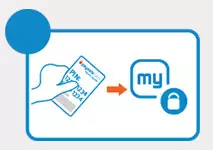
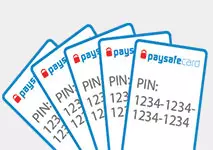
 It works in a simple way: go to a retail location that sells Paysafecard vouchers, pay in cash, and receive a ticket with a 16-digit PIN code. You can enter this code when using any Internet service that accepts the payment method.
On the Paysafecard website, you can find the nearest physical retail locations where these cards are sold. Normally they are corner stores, gas stations, supermarkets, etc. Cards are sold in denominations of €10, €25, €50 and €100, although these vary depending on the country and currency. For larger purchases, consumers may combine several PINs to create a single larger amount.
Paysafecard Registration Process
During their online gaming sessions, casino enthusiasts often prefer Paysafecard because it is one of the most convenient and secure payment options available. Paysafecard is accepted worldwide, and one of its greatest benefits is that players do not need a bank account to get started.
Among the many reasons for its popularity are its speedy processing times – deposits are instantly credited to players’ balances. Paysafecard also provides high security; while executing payments, players are never asked to share their banking details.
Even if players have never used Paysafecard before, they need not worry, as making payments through it is a breeze. Regardless of how players use Paysafecard, they can rest assured that depositing and potentially withdrawing their winnings will be a hassle-free process.
Nothing beats the convenience of using the same payment method for both deposits and withdrawals, and fortunately, this is possible after creating a Paysafecard account. Creating a myPaysafecard account is quick and easy and offers several benefits.
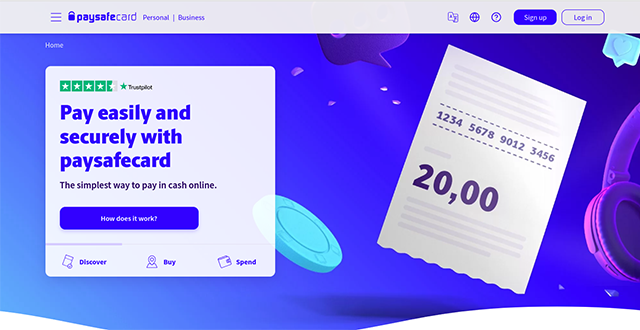
- The first step is to visit the official Paysafecard website and click the Sign-up button in the upper-right corner of the screen.

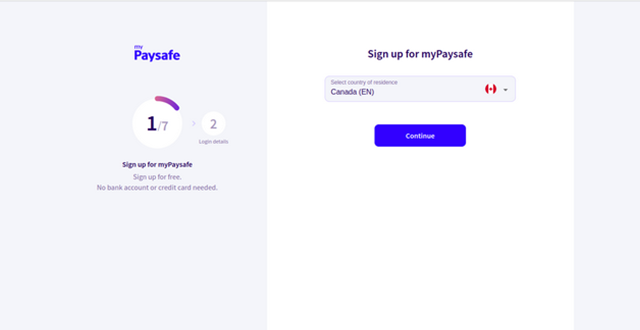
- While registering for myPaysafecard, players must select their country of residence.
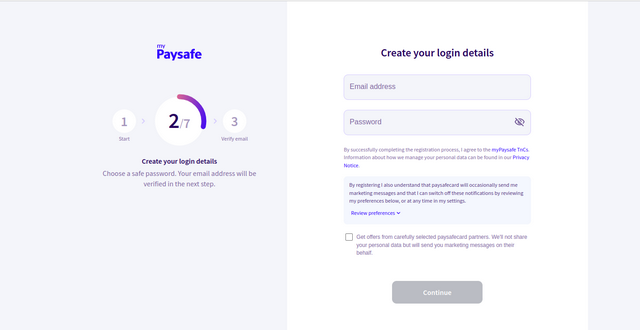
- Next, casino enthusiasts create their login details and provide a valid email address along with a strong password. Players should ensure the email address is valid; otherwise, they will be unable to proceed.
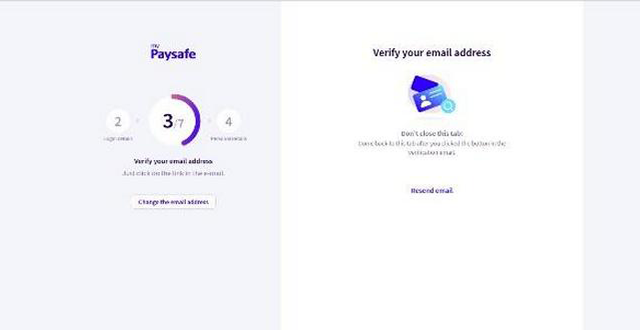
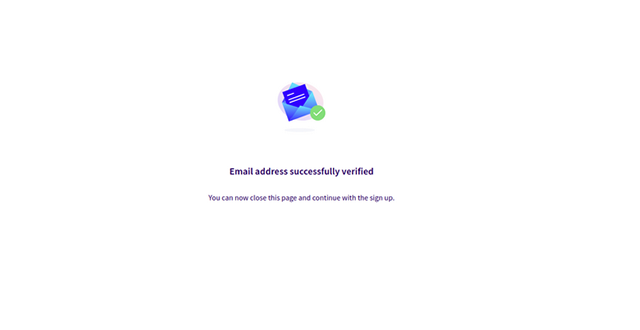
- Gambling enthusiasts must then verify their email address using the link sent by Paysafecard.
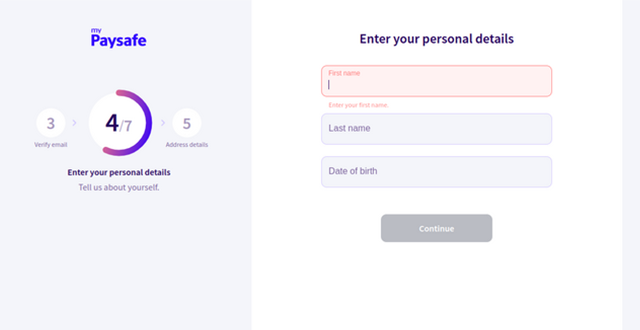
- After verifying their email, players enter their first and last names along with their date of birth.
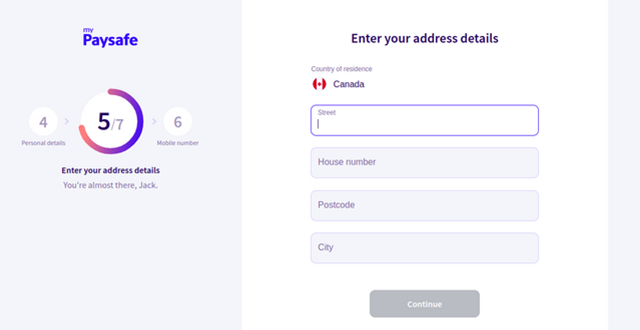
- Next, they provide their address details, including street, house number, postcode, and city.
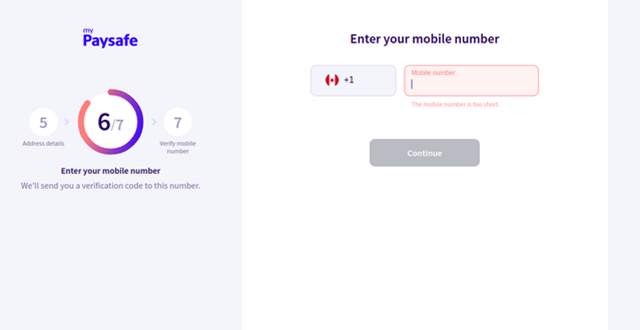
- Subsequently, players enter their mobile number. They must ensure it is correct because a verification code will be sent to this number.
- Once the mobile number is verified, players can start making payments via Paysafecard. After registering for myPaysafecard, transactions can be completed simply by using their login details, and larger amounts become available.
Video Introduction of Paysafecard
Deposits to Online Casinos
Depositing to a casino account is easy. Choose your payment method, select the ‘prepaid card’ option, and click on Paysafecard. Enter the 16-digit PIN, choose the amount you wish to deposit, and the transaction is completed instantaneously.
Withdrawals from Online Casinos
Withdrawing your winnings via Paysafecard is more inconvenient than with other payment services. In 2015, Paysafecard introduced a service that allows gambling websites to forward money to players. Players can cash out to their Paysafecard accounts by entering the email address used during registration. After the sum is transferred to the Paysafecard account, it may either be deposited again at a casino or withdrawn from an ATM using the Paysafecard Mastercard.
Fees and Limits
 Paysafecard does not charge users for transactions, although casinos may include a fee for using this payment method, which they must disclose. The practice of charging a commission on transactions is slowly but surely dying out in the online casino industry. As a result, most gambling websites prefer to bear the cost rather than impose it on their customers.
However, a small number of online casinos have not caught up with the times and may charge a fee. This usually does not exceed 5% of the total deposit and, insignificant as it may be, it does not instill confidence in players. If you ever encounter a casino that charges commission, you can always play elsewhere. Paysafecard is accepted almost universally, so you should have no problem finding another website that will take your money.
Paysafecard is intended for relatively small transactions; therefore, mainly budget-oriented players make full use of the service. In terms of limits, a Paysafecard voucher can hold up to €100 per PIN. On the ‘Deposit’ page of an online casino, users can combine up to 10 unique PINs for a maximum deposit of €1,000, or your currency’s equivalent. This is considerably lower than the limits offered by credit cards, e-wallets, and bank transfers. As such, the service is better suited to those who like to play a few hands of blackjack now and then, rather than serious high rollers. Granted, you can purchase more than 10 vouchers at a time, although that would be impractical.
If a client wants to redeem a prepaid card for cash, a fee of €7.50 is deducted from the refunded sum. To do this, one must contact the customer support team via the Paysafecard website. From there, proof of identification is required, along with a bank account number to which the money will be sent. The verification procedure and bank transfer processing can take several business days.
There are no maintenance fees for a voucher during the first 12 months. If, however, after that time the balance has not been spent, a fee of €2.00 will be taken from the card for each subsequent month of inactivity.
Paysafecard also offers the opportunity to pay in a foreign currency. The website features a currency conversion calculator to display current rates. Additionally, an exchange fee of a few percent is applied, depending on the currencies involved. The Paysafecard service is available in dozens of countries around the globe, and the company supports the local currency of each state. This means you can load a PIN in your home currency and deposit to your online casino balance in that currency.
Security
Paying online via Paysafecard is one of the safest methods available. Just like paying in cash, you are not required to submit any personal or banking information. This is convenient because you neither waste time when purchasing a voucher nor reveal any sensitive data. In an age where the safety of personal data is paramount, Paysafecard offers a payment solution that requires none.
Where your money is concerned, you can rest assured it is safe. The only way your Paysafecard balance can be spent is by entering the 16-digit PIN found on the receipt. This ensures that only those in possession of the code can make payments. As a result, the only way to put your money at risk is by sharing your PIN or losing the receipt.
Advantages
 The Paysafecard method of payment is superior to card transactions in several ways. For instance, you do not have to deal with a bank at any point. Some banks are known to discriminate against gamblers and may cancel deposits to online casinos. Additionally, Paysafecard offers something that a bank cannot – instant deposits. A normal bank transaction will take anywhere between one and five business days to clear, making the whole process slow and annoying. Paysafecard spares you this inconvenience since any payment made via the service is processed immediately. You can open an account, top up your balance, and start playing, all within minutes.
Moreover, Paysafecard is as simple and easy to use as possible. Making a deposit only requires entering 16 digits and confirming the transfer. There are no tedious registration or verification procedures that steal precious time from your gaming sessions. Combined with the fact that there is hardly any online casino that does not accept Paysafecard, it is difficult to find other services with comparable perks.
In addition to its website, Paysafecard also has a mobile application for Android and iOS, which offers several useful features. It provides users with a map of all nearby retail stores where prepaid cards can be purchased. It also provides directions using a system similar to Google Street View, allowing you to see exactly where the store is. You can also check your card balance online and review previous transactions.
Using prepaid cards makes it easier to manage your gambling budget. When using a credit card, you might overdraw and exceed your credit limit, incurring extra fees. Conversely, when you deplete the balance on a prepaid card, you must go out of your way to buy another one, making it harder to lose track and gamble away all your money. This makes it an ideal solution for players on a tight budget or problem gamblers who need to control their spending.
Another point to consider is that Paysafecard is available to a wide user base. The service is offered in the following countries: Belgium, Bulgaria, the Czech Republic, the Republic of Ireland, Denmark, Germany, Greece, Spain, France, Georgia, Croatia, Italy, Cyprus, Luxembourg, Hungary, Malta, the Netherlands, Norway, Austria, Poland, Latvia, Lithuania, Portugal, Romania, Switzerland, Sweden, Finland, Slovenia, Slovakia, Turkey, the United Kingdom, Argentina, Brazil, Canada, Mexico, Peru, the United States of America, Uruguay, Kuwait, Saudi Arabia, United Arab Emirates, Australia, New Zealand, and Egypt. It also supports all local currencies, thus allowing everyone to avoid exchange fees, provided the online casino accepts payment in that particular currency.
Guaranteed anonymity is an added bonus that many may not fully appreciate. The vouchers are bought with physical currency, and there is no exchange of personal or banking information. Security-conscious players will not have to worry about their personal data being compromised and can enjoy their games in peace.
Disadvantages
Of course, it would not be fair to present only the positive aspects of the service. Unfortunately, there are some downsides to using Paysafecard as your main payment solution, which you can read more about below.
The main issue with Paysafecard is that you have to purchase a new voucher every time you use up all your money. For some people, this might mean a few clicks on their smartphone, but others might need to drive to a nearby store or gas station. It is an inconvenience, but a necessary one.
The inability to withdraw winnings can be a detriment, forcing you to rely on two services – one for deposits and one for withdrawals. Some might consider this too much hassle and choose a method that offers both, or simply be put off online gambling altogether. Many Paysafecard users prefer to receive their winnings by way of bank transfer. This withdrawal method is known to be slow, taking several business days to clear. Compared with other withdrawal solutions, it is outdated and painfully slow.
Another drawback you should take into account is the low limit per transaction. As stated above, Paysafecard was not designed for transacting large sums of money. As a result, the maximum amount you can deposit is €1,000, and even that is achieved by combining 10 individual vouchers. There is no simple way to make large deposits with Paysafecard, and if that is your goal, we recommend you explore other payment solutions covered on this website.
Despite these drawbacks, Paysafecard remains the preferred payment method for many gamblers. You’d be hard-pressed to find a casino that would not take your money this way.
FAQ
Due to the nature of the Paysafecard service, you are entirely responsible for the PIN from the moment you purchase it to the moment you decide to spend its balance. The company cannot refund any of the funds loaded on the voucher unless you can provide them with the 16-digit code on the receipt. If you know the code, you can freeze the balance and have the money transferred to your bank account after informing the support team. If that is not the case, there is nothing to be done. For this reason, it is very important that you keep close guard of your PINs and make sure you do not lose them.
Any payment made via Paysafecard is permanent and cannot be refunded to the voucher. If you have deposited money into an online casino, you can have that sum transferred to your bank account, though this will take several business days.
Paysafecard is available at a large number of retail locations, including supermarkets, gas stations, newspaper stands, and so on. It is impossible to list every location here, but you can find a map on the Paysafecard website that covers all known retail locations offering Paysafecard vouchers. It will allow you to see which retailers provide the service.
The Paysafecard mobile app can be downloaded for Android and iOS devices. You can find it in each platform’s app store – the Apple App Store and the Google Play Store, respectively. Downloading it is free of charge and it is easy to set up.